
angular
Angular Material Table Expandable + NGRX 2026 : Guide Dev Ivoirien (Store, Reducers, Effects)
Un tableau expandable Angular Material + NGRX (state management) est incontournable dans tout projet Angular sérieux en Côte d'Ivoire (banque, admin, fintech). Tutoriel complet avec code TypeScript pour dev ivoirien 2026.

Dans cet article, je vous montre comment utiliser Angular Material et NGRX pour avoir un tableau dynamique comme celui sur mon portfolio en ligne weroamba.com.
Angular Material vise à fournir aux développeurs le meilleur design UI/UX qu'ils puissent imaginer. Il est responsive et adapté aux mobiles, ce qui permet de construire des applications et des pages Web attrayantes en respectant les principes de conception Web modernes.
NgRx Store fournit une gestion d'état réactive pour les applications angulaires inspirées de Redux.
Il offre plusieurs avantages en simplifiant l'état de votre application en objets simples, en appliquant un flux de données unidirectionnel.
Pour cet exemple j'utilise la version 11 d'Angular.
Démonstration
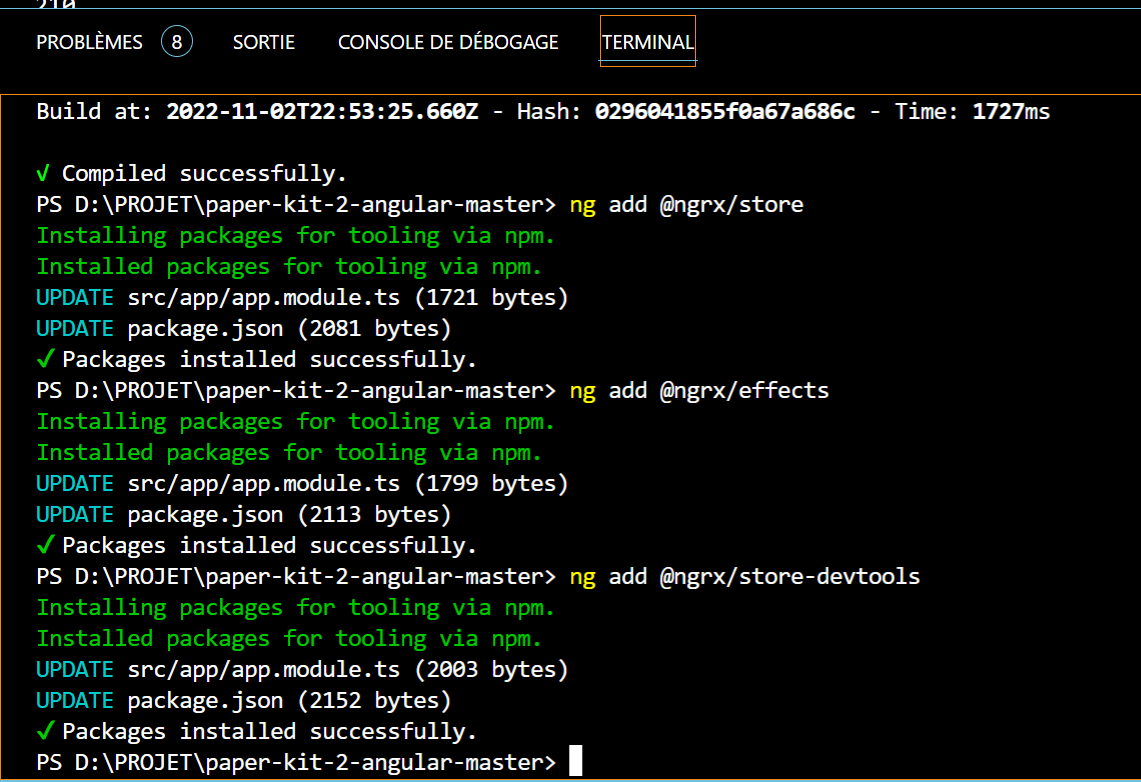
Installation des packages NGRX
Nous allons d'abord installer nos packages de NGRX :
ng add @ngrx/store
ng add @ngrx/effects
ng add @ngrx/store-devtools
Configuration de NGRX
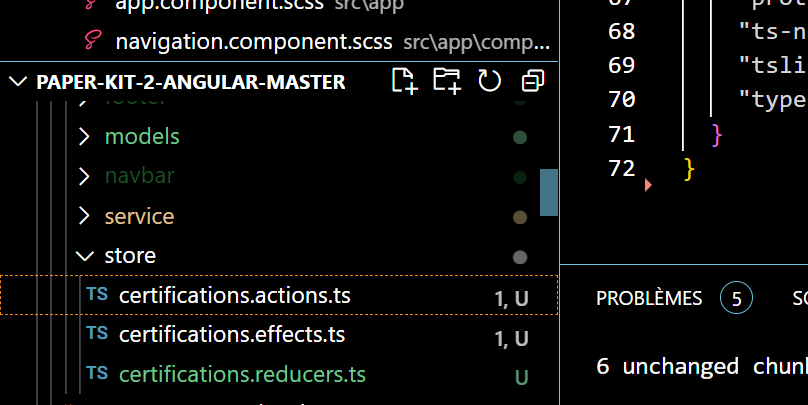
Dans notre dossier shared, nous créons un dossier store et nous ajoutons les fichiers suivants :
1. Actions (certifications.actions.ts)
Dans notre fichier certifications.actions.ts, nous ajoutons l'élément suivant :
import { Action } from "@ngrx/store";
export const GET_CERTIFICATIONS_REQUEST = '[GET_ALL] Certifications Request';
export const GET_CERTIFICATIONS_SUCCESS = '[GET_ALL] Certifications Success';
export const GET_CERTIFICATIONS_ERROR = '[GET_ALL] Certifications Error';
/****************************************
 * GET all certifications
 ****************************************/
export class GetAllCertificationsRequest implements Action {
  readonly type = GET_CERTIFICATIONS_REQUEST;
  constructor(public payload?: string) {
  }
}
export class GetAllCertificationsSuccess implements Action {
  readonly type = GET_CERTIFICATIONS_SUCCESS;
  constructor(public payload: any[]) {
  }
}
export class GetAllCertificationsError implements Action {
  readonly type = GET_CERTIFICATIONS_ERROR;
  constructor(public payload: Error) {
  }
}
2. Reducers (certifications.reducers.ts)
Dans notre fichier certifications.reducers.ts nous ajoutons le code suivant :
import { createFeatureSelector, createSelector } from '@ngrx/store';
import * as certificationActions from './certifications.actions';
export interface State {
    data: any;
    action: string;
    done: boolean;
    error?: Error;
  }
  const initialState: State = {
    data: [],
    action: null,
    done: false,
    error: null
  };
  export function reducer(state = initialState, action: {type: string;
    payload?: any;}): State {
    // ...state create immutable state object
    switch (action.type) {
      /*************************
       * GET all certifications actions
       ************************/
      case certificationActions.GET_CERTIFICATIONS_REQUEST:
        return {...state, action: certificationActions.GET_CERTIFICATIONS_REQUEST, done: false};
      case certificationActions.GET_CERTIFICATIONS_SUCCESS:
        return {...state, data: action.payload, done: true};
      case certificationActions.GET_CERTIFICATIONS_ERROR:
        return {...state, done: true, error: action.payload};
    }
    return state;
  }
  /*************************
   * SELECTORS
   ************************/
  export const getCertificationsState = createFeatureSelector<State>('certifications');
  export const getAllCertifications = createSelector(getCertificationsState, (state: State) => state.data);
3. Effects (certifications.effects.ts)
Dans notre fichier certifications.effects.ts nous ajoutons aussi le code suivant :
import { Injectable } from "@angular/core";
import { Actions, Effect, ofType } from "@ngrx/effects";
import { Action } from "@ngrx/store";
import { Observable } from "rxjs";
import * as certificationActions from './certifications.actions';
import { catchError, map, switchMap } from "rxjs/operators";
import { CertificationService } from "../service/certification.service";
import { GetAllCertificationsError, GetAllCertificationsSuccess } from './certifications.actions';
@Injectable()
export class CertificationEffects {
  constructor(private actions$: Actions, private certificationService: CertificationService) {
  }
  @Effect()
  getAllCertifications$: Observable<Action> = this
    .actions$.pipe(
      ofType(certificationActions.GET_CERTIFICATIONS_REQUEST),
      map((action: certificationActions.GetAllCertificationsRequest) => action.payload),
      switchMap((queryParams) => this.certificationService.getAllCertifications(queryParams)),
      map(result => new GetAllCertificationsSuccess(result)),
      catchError((err) => [new GetAllCertificationsError(err)])
    );
}
Configuration du module principal
Dans notre module principal nous ajoutons les éléments suivants :
import { BrowserModule } from '@angular/platform-browser';
import { NgModule } from '@angular/core';
import { FormsModule } from '@angular/forms';
import { NgbModule } from '@ng-bootstrap/ng-bootstrap';
import { RouterModule } from '@angular/router';
import { AppRoutingModule } from './app.routing';
import { AppComponent } from './app.component';
import { NavbarComponent } from './shared/navbar/navbar.component';
import { FooterComponent } from './shared/footer/footer.component';
import { ComponentsModule } from './components/components.module';
import { ExamplesModule } from './examples/examples.module';
import { BrowserAnimationsModule } from '@angular/platform-browser/animations';
import { PerfectScrollbarModule } from 'ngx-perfect-scrollbar';
import {
  PERFECT_SCROLLBAR_CONFIG,
  PerfectScrollbarConfigInterface
} from 'ngx-perfect-scrollbar';
import { PdfViewerModule } from 'ng2-pdf-viewer';
import { ActionReducerMap, StoreModule } from '@ngrx/store';
import { EffectsModule } from '@ngrx/effects';
import { StoreDevtoolsModule } from '@ngrx/store-devtools';
import { environment } from '../environments/environment';
import * as  certificationsReducer  from './shared/store/certifications.reducers';
import { CertificationEffects}  from './shared/store/certifications.effects';
const DEFAULT_PERFECT_SCROLLBAR_CONFIG: PerfectScrollbarConfigInterface = {
  wheelSpeed: 0.5,
  swipeEasing: true,
  minScrollbarLength: 40,
  maxScrollbarLength: 300
};
export const reducers: ActionReducerMap<any> = {
  certifications: certificationsReducer.reducer,
};
@NgModule({
  declarations: [
    AppComponent,
    NavbarComponent,
    FooterComponent
  ],
  imports: [
    BrowserModule,
    NgbModule,
    FormsModule,
    RouterModule,
    ComponentsModule,
    ExamplesModule,
    AppRoutingModule,
    BrowserAnimationsModule,
    PerfectScrollbarModule,
    StoreModule.forRoot(reducers),
    EffectsModule.forRoot([CertificationEffects]),
    StoreDevtoolsModule.instrument({ maxAge: 25, logOnly: environment.production }),
  ],
  providers: [
    {
      provide: PERFECT_SCROLLBAR_CONFIG,
      useValue: DEFAULT_PERFECT_SCROLLBAR_CONFIG
    },
  ],
  bootstrap: [AppComponent]
})
export class AppModule { }
Composant du tableau expandable
Affichons maintenant les données dans notre tableau angular material table dynamique avec possibilité expandable.
Dans notre fichier navigation.ts :
import { trigger } from '@angular/animations';
import { SelectionModel } from '@angular/cdk/collections';
import {  ChangeDetectorRef, ViewEncapsulation } from '@angular/core';
import { ViewChild } from '@angular/core';
import { Component, OnInit } from '@angular/core';
import { MatPaginator } from '@angular/material/paginator';
import { MatSort } from '@angular/material/sort';
import { MatTableDataSource } from '@angular/material/table';
import { state, style, transition, animate } from '@angular/animations';
import { select, Store } from '@ngrx/store';
import * as fromCertification from 'app/shared/store/certifications.reducers';
import { getAllCertifications } from '../../shared/store/certifications.reducers';
import { GetAllCertificationsRequest } from 'app/shared/store/certifications.actions';
@Component({
    selector: 'app-navigation',
    templateUrl: './navigation.component.html',
    styleUrls: ['./navigation.component.scss'],
    encapsulation: ViewEncapsulation.None,
    animations: [
        trigger('detailExpand', [
            state('collapsed', style({ height: '0px', minHeight: '0', display: 'none' })),
            state('expanded', style({ height: '*', display: 'block' })),
            transition('collapsed=>expanded', animate('225ms cubic-bezier(0.2, 0.6, 0.2, 1)')),
            transition('expanded=>collapsed', animate('20ms cubic-bezier(0.2, 0.0, 0.4, 1)'))]),
    ],
})
export class NavigationComponent implements OnInit {
    displayedColumns = [
        'name',
        'plateform',
        'validate',
    ];
    displayedColumnsTwo = [
        'file',
    ];
    expandedElement: any | null;
    @ViewChild(MatPaginator, { static: true }) paginator: MatPaginator;
    @ViewChild('sort1', { static: true }) sort: MatSort;
    selection = new SelectionModel<any>(true, []);
    customersResult: any[] = [];
    dataSource = new MatTableDataSource([]);
    dataSource2 = new MatTableDataSource([""]);
    onLoading = true;
    dataItems: any;
    pageSizeOptions = [10, 25, 50];
    queryParams: string;
    totalData: any;
    constructor(private store: Store<{certification:fromCertification.State}>) {
        this.getCertifications();
    }
    ngOnInit() {
        if (this.paginator) {
            this.paginator.page.subscribe((data) => {
                this.queryParams = `pageSize=${data.pageSize}&page=${data.pageIndex + 1}`;
                this.getCertifications(this.queryParams);
            });
        }
    }
    public getCertifications(queryParams?:string){
        this.store.dispatch(new GetAllCertificationsRequest(queryParams));
        this.store.select(getAllCertifications).subscribe(data=>{
            this.onLoading = false;
            this.dataItems =data;
            this.dataSource = new MatTableDataSource( this.dataItems.data);
            if ( this.dataItems.data &&  this.dataItems.data.length) {
                this.totalData =  this.dataItems.data.length;
            }
        });
    }
}
Template HTML
Et enfin dans notre fichier navigation.component.html, nous avons le code suivant :
<perfect-scrollbar style="height: 120vh">
  <div class="loading-list" *ngIf="onLoading">
    <span
      *ngIf="onLoading"
      class="spinner-grow spinner-grow-md spinner-primary"
      role="status"
      aria-hidden="true"
    ></span>
    <span
      *ngIf="onLoading"
      class="spinner-grow spinner-grow-md spinner-secondary"
      role="status"
      aria-hidden="true"
    ></span>
  </div>
  <table
    mat-table
    multiTemplateDataRows
    class="table table-striped"
    #table
    [dataSource]="dataSource"
    matSort
    sort="matSort"
  >
    <ng-container matColumnDef="name">
      <th
        mat-header-cell
        *matHeaderCellDef
        class="custom-color"
        style="color: black; font-size: 14px"
      >
        <h6>Cours</h6>
      </th>
      <td mat-cell *matCellDef="let certification">
        {{ certification.name }}
        <button
          mat-icon-button
          (click)="expandedElement = expandedElement === certification ? null : certification"
        >
          <ng-container
            *ngIf="expandedElement === certification; else noExpandedElement"
          >
            <mat-icon>expand_less</mat-icon>
          </ng-container>
          <ng-template #noExpandedElement>
            <mat-icon>expand_more</mat-icon>
          </ng-template>
        </button>
      </td>
    </ng-container>
    <ng-container matColumnDef="plateform">
      <th
        mat-header-cell
        *matHeaderCellDef
        class="custom-color"
        style="color: black !important; font-size: 14px"
      >
        <h6>Plateforme</h6>
      </th>
      <td mat-cell *matCellDef="let certification">{{ certification.plateform_name }}</td>
    </ng-container>
    <ng-container matColumnDef="validate">
      <th
        mat-header-cell
        *matHeaderCellDef
        style="color: black !important; font-size: 14px"
      >
        <h6>Periode</h6>
      </th>
      <td mat-cell *matCellDef="let certification">{{ certification.validate_date }}</td>
    </ng-container>
    <ng-container matColumnDef="expandedDetail">
      <td
        mat-cell
        *matCellDef="let element"
        [attr.colspan]="displayedColumns.length"
      >
        <div
          [@detailExpand]="
            element == expandedElement ? 'expanded' : 'collapsed'
          "
          style="position: relative"
        >
          <div class="loading-child-list" *ngIf="onLoadingChild">
            <mat-spinner *ngIf="onLoadingChild"></mat-spinner>
          </div>
          <table
            class="table table-striped"
            mat-table
            #table
            [dataSource]="dataSource2"
          >
            <ng-container matColumnDef="file">
              <th
                mat-header-cell
                *matHeaderCellDef
                class="font-sm mat-cell"
                style="font-size: 14px"
              >
                <h6 style="font-size: 15">Certificat</h6>
              </th>
              <td mat-cell *matCellDef="let certification">
                <pdf-viewer
                  [src]="element.img"
                  [original-size]="false"
                ></pdf-viewer>
              </td>
            </ng-container>
            <tr
              mat-header-row
              *matHeaderRowDef="displayedColumnsTwo; sticky: true"
            ></tr>
            <tr
              mat-row
              *matRowDef="let row; columns: displayedColumnsTwo"
            ></tr>
          </table>
        </div>
      </td>
    </ng-container>
    <tbody>
      <tr mat-header-row *matHeaderRowDef="displayedColumns"></tr>
      <tr
        mat-row
        *matRowDef="let element; columns: displayedColumns"
        class="example-element-row"
        [class.example-expanded-row]="expandedElement === element"
      ></tr>
      <tr
        mat-row
        *matRowDef="let row; columns: ['expandedDetail']"
        class="example-detail-row"
      ></tr>
    </tbody>
  </table>
  <div class="mat-table__message" *ngIf="onLoading">
    Veuillez patienter chargement en cours ...
  </div>
  <div
    class="mat-table__message"
    style="
      padding: 30px !important;
      text-align: center;
      font-weight: 500;
      color: #006699;
    "
    *ngIf="onLoading"
  >
    <img
      height="100"
      width="100"
      style="height: 100px; width: 100px"
      src="/assets/img/file-searching.svg"
      alt="Not found"
    />
    <h5></h5>
  </div>
</perfect-scrollbar>
<div class="mat-table__bottom">
  <mat-spinner [diameter]="25" *ngIf="onLoading"></mat-spinner>
  <mat-paginator
    [pageSize]="dataItems?.pageSize"
    [length]="dataItems?.total"
    [pageSizeOptions]="pageSizeOptions"
    [showFirstLastButtons]="true"
  ></mat-paginator>
</div>
Styles CSS
Ajoutons l'élément suivant dans le CSS du component :
pdf-viewer {
  display: flex;
  align-items: center;
  justify-content: center;
  filter: drop-shadow(5px 5px 5px #222222);
  height: 400px;
  width: 500px;
  margin: 0 auto;
}
Fonctionnalités principales
Ce tableau expandable offre plusieurs fonctionnalités avancées :
🔸 Fonctionnalités clés :
- Table Material Design : Interface moderne et responsive
- Lignes expandables : Affichage de détails supplémentaires
- Gestion d'état NGRX : State management réactif
- Pagination : Navigation entre les pages de données
- Animations : Transitions fluides pour l'expansion/contraction
- Loading states : Indicateurs de chargement
- PDF Viewer : Affichage de documents PDF dans le détail
🔸 Avantages de cette implémentation :
- Performance : Chargement optimisé des données
- UX/UI : Interface utilisateur intuitive
- Maintenabilité : Code organisé avec NGRX pattern
- Scalabilité : Architecture évolutive
- Accessibilité : Respect des standards Material Design
Conclusion
Nous avons terminé. Vous pouvez maintenant vous inspirer et créer un tableau expandable avec Angular Material et NGRX.
Cette implémentation vous donne une base solide pour créer des interfaces de données complexes avec :
- Une architecture NGRX bien structurée
- Des animations fluides
- Une pagination efficace
- Un design Material moderne
Vous pouvez adapter ce code selon vos besoins spécifiques et l'intégrer dans vos projets Angular.
#Angular #AngularMaterial #NGRX #TypeScript #WebDevelopment